01
Connect your agent
Press Connect next to Claude Code, Codex or Cursor in Settings, or run glost connect claude-code. No token or port is written into another app's files.
Early access Desktop 3D app
Image to 3D hands you a lumpy shape. Glost, driven by your coding agent, turns it into a real asset: retopologized, unwrapped, textured, checked against your spec and exported for your engine.
A confirmation now, then one email when the first build ships.
Connects in one click to
Claude Code, Codex, Gemini CLI, Cursor, VS Code, Windsurf, Zed, Claude Desktop and Antigravity.

Glost's drip mark in 3D, its orange glaze still dripping, turns into fifteen models made in Glost, one after another: an oak barrel, a 1980s coupe, a slime as pixel art, a mushroom cottage as voxel art, a Corinthian helmet, a fighter plane, a knight as pixel art, a treasure chest, a lighthouse as voxel art, a desert locust, a dragon as pixel art, a tin toy robot, a retro rocket as voxel art, an 1800s carriage and a juniper bonsai as voxel art. Each one assembles from voxels that land as clay, a glowing line fires it finished, and then it plays its Glost rig: the coupe raises its headlights and opens its doors, the plane spins up its propeller, the chest lifts its lid, the robot waddles on the spot, the slime bounces, the knight marches and swings its sword, the dragon beats its wings and lifts off, and the voxel art moves too.
Glost15 models, made in Glost
01 The problem
Image to 3D is a real leap: a prompt in, a textured model out in about a minute. Then the relay starts. Retopology in Blender, a fresh unwrap, textures made again, a rig that fits only some bodies, weights, a retargeted clip, and an import that lands at the wrong scale. Every stop is another tool, another file and another undo history.
01
Today
Meshy’s API leaves remeshing off and returns triangles by default.1 Strong light in the reference photo bakes shadows into the texture.2 Fingers can fuse or come out in the wrong number,3 and floating parts need cleaning up by hand.4
With Glost
Calls Meshy, Tripo, Rodin or Hunyuan when you choose, or TRELLIS.2 on your own GPU. Then it repairs holes, degenerate faces and flipped normals, and scales the mesh to the size in the spec.
geometry.generategeometry.repairgeometry.scale_to_spec
02
Today
Remeshing in Blender throws the UVs away, so you unwrap and bake again, and retopology by hand takes hours.5 One Polycount thread puts it at about half a day per 30 props.6 Meshy’s own guide says to decimate in Blender and build LODs yourself.7
With Glost
Remeshes to quads inside the spec’s triangle budget: 200,320 triangles to 5,000 faces in 1.72 s, 99.8% of them quads, mirrored when the model is symmetric. LODs come from meshoptimizer.
geometry.remeshgeometry.retopomesh.lods
03
Today
Meshy’s UV unwrap takes at most 40,000 faces and hands back an untextured model.8 The generated texture was painted for the old mesh, so it has to be made again.
With Glost
Unwraps with xatlas and checks flips, overlaps, padding and texel density. Textures are projected onto the new UVs from several views, seams repaired and albedo kept in range.
mesh.unwraptexture.generateverify.uv
04
Today
Meshy’s API rigs humanoids that face +Z, with tails and faces left to you.9 Mixamo rigs humanoids only.10 In one test the hip pivots sat 5 to 15 cm off, so the feet slid.11
With Glost
Classifies the mesh, cuts fused fingers apart, fits a 70 joint skeleton, keeps each finger’s weights inside that finger, and tests T, A, fist, spread, squat and reach. Lids and drawers get hinges and sliders.
rig.autorig.test_poses
05
Today
A Mixamo T pose on Unreal’s A pose skeleton twists the arms when you retarget,12 and bones still get mapped by hand.11
With Glost
Retargets between Mixamo, Rigify, Unreal, HumanIK and Character Creator skeletons, with rest poses aligned, limb lengths compensated and feet kept planted.
anim.retargetanim.generate
06
Today
Meshy’s own guide warns that a model can arrive “100x too big” in Unity.4 Unreal reads DirectX normal maps while Godot and Blender read OpenGL,13 Unity URP wants smoothness in the metallic map’s alpha,14 and Unreal only picks up collision named UCX_.15
With Glost
Writes a profile per target with the right axes, units, handedness and normal maps, adds LOD chains and collision hulls, packs the maps, and imports every export again to compare it within 0.1 mm.
export.runverify.export
07
Today
Meshy Pro is $20 for 1,000 credits a month. Through the API a textured model is 30 credits, a rig 5 and each animation 3, and unused credits expire.16 On plans below Enterprise, Meshy may train on what you make.17
With Glost
Runs on your machine first. A paid step shows its estimate and waits for your yes, inside budgets you set, and every step lands in one history that says who did it.
pipeline.text_to_assetproject.undo
Meshy is good at what it does, and Glost can call it as a step. These are the limits its own pages describe, plus tests and threads from people who ship games. Three of the sources sell competing tools.
Generated meshes
are unfired clay.
Glost is the last firing.
glost firing (noun)
The glaze firing: the last one, when the glaze melts into glass and a matte pot comes out of the kiln glossy and finished. It is the job Glost does for an asset.
02 How it works
Three steps, and the middle one is a sentence.
Press Connect next to Claude Code, Codex or Cursor in Settings, or run glost connect claude-code. No token or port is written into another app's files.
Write what you need in plain words. Your agent turns it into a spec with acceptance criteria and starts building while you watch.
Pick a concept, approve or decline paid steps, or take over in the viewport. Export for Unreal, Unity, Godot or Blender, and Glost checks the file by importing it again.
03 The build
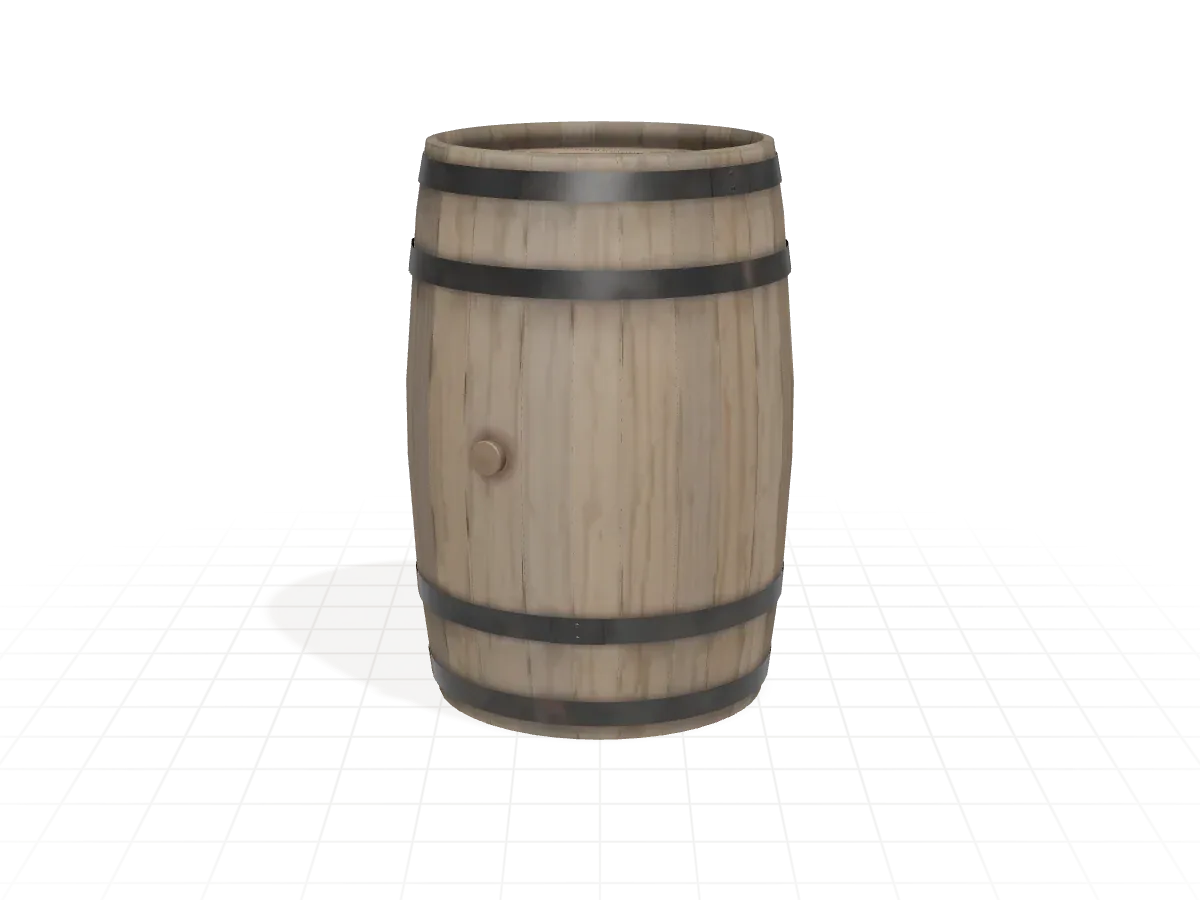
One barrel, eight steps. The agent and the app send the same commands, so nothing happens out of view. Pick a step to see what the agent ran and what Glost checked.
Step 01 of 08
spec.create
“A weathered oak barrel bound with two iron hoops, about 70 cm tall.” Your agent turns it into a spec: dimensions, a triangle budget and the checks the asset has to pass.
Acceptance criteria are written down before any modeling.
Step 02 of 08
geometry.model · add hoops
The agent blocks out the barrel and adds the hoops. Every operation lands in a construction history, so any part can change later without starting over.
A clay render to judge the shape before any material.
Step 03 of 08
geometry.scale_to_spec · 0.70 m
The first block out came out 0.88 m tall. Glost scales it to the 0.70 m in the spec, so it lands in your engine at the size you asked for.
0.70 m tall, inside the spec box.
Step 04 of 08
render.snapshot · wireframe
A wireframe render shows what you are shipping: 4,532 triangles in clean strips and rings, light enough for a game.
4,532 triangles, inside the 6,000 budget.
Step 05 of 08
uv.unwrap · uv.pack orient
Every stave unwraps as one upright strip and every hoop as one band, all at one texel density, so a texture has somewhere clean to land.
A UV checker render shows any stretching, flips or seams.
Step 06 of 08
material.set_texture · triplanar
Oak and iron go on as a triplanar material. For a generated texture, Glost projects several views onto the UVs instead and repairs the seams.
Checked in the lookdev modes before the final render.
Step 07 of 08
render.snapshot · hybrid
A hybrid ray traced render checks the look on Glost's own Vulkan renderer, before anything leaves the app.
Rendered headless, so it runs the same on a server.
Step 08 of 08
export.run · glb
The barrel leaves as a GLB with a profile for your engine. Glost imports the file again and checks it against the spec before it calls the job done.
verify.export passed on the file it wrote.
Every tool an agent can call is also a glost subcommand, so you can run any of these steps yourself.
04 Rigging
Fifteen models, rigged and animated in Glost by an agent: joints at the real pivots, parts hung from them or skinned, linkages held by constraints, and clips that start and end at rest. Pick one, and drag the line to see its skeleton.
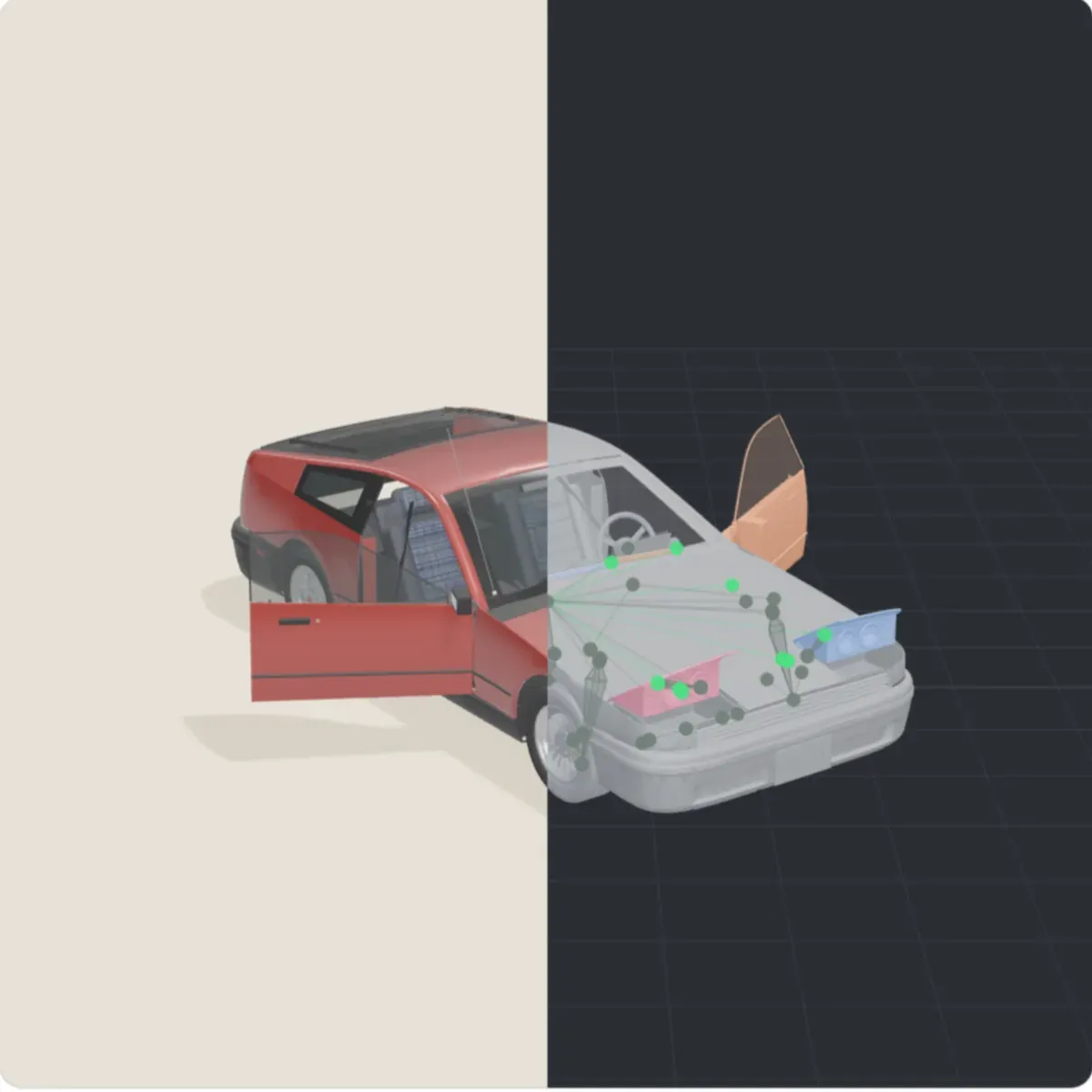
The model plays its clip. Left of the line it is drawn as in the hero; right of the line is a dev view, its parts coloured by the joint that moves them and its skeleton drawn over it. Space pauses and plays, the arrow keys turn the model, and the line moves with its own arrow keys.
skeleton.create.skin.bind.constraint.edit).anim.edit, and the constraints baked into the clip with anim.bake.export.run, played back in three.js to check it.Glost retargets animation between Mixamo, Rigify, Unreal, HumanIK and Character Creator skeletons: rest poses aligned, limb lengths compensated, feet kept planted. Joints are renamed to the convention your engine expects on export.
For a generated character, Glost's auto rig finds landmarks on rendered views, fits a 70 joint reference skeleton and cuts fused fingers apart. It is built and tested on Glost's synthetic test characters; the learned keypoint and skeleton models it uses on real generated characters are still being wired in.
05 Into your engine
Unreal is Z up in centimeters and left handed, with DirectX normal maps. Unity is Y up in meters. Godot and Blender disagree with both. Guess wrong and the barrel arrives a hundred times too big, on its side, with its bumps lit from below.
| Target | Up axis | Units | Handedness | Normal maps |
|---|---|---|---|---|
| Unreal | Z up | cm | Left | DirectX |
| Unity HDRP and URP | Y up | m | Left | OpenGL |
| Godot | Y up | m | Right | OpenGL |
| Blender | Z up | m | Right | OpenGL |
| Maya | Y up | cm | Right | OpenGL |
| 3ds Max | Z up | m | Right | DirectX |
Positions within 0.1 mm, normals within 0.5°, skin weights and joint motion compared too.
LOD chains as MSFT_lod in glTF and an LOD group in FBX.
Convex hulls named UCX_ for Unreal, or a _collider mesh elsewhere.
ORM, Unity's HDRP mask or metallic smoothness, compressed to BC7 or ASTC.
06 Control
Agents connect to the Glost you have open, not to a hidden copy. You watch the same viewport, and nothing that costs money happens without you.
Paid steps stop and ask, with the price and the reason. Try it.
Needs you
Approve cloud spend?
Texture the rope seat again with gpt-image-2.5 flare: 8 views, about $1.12. The local result scored 0.71 on held out views; the spec asks for 0.80.
texture.generate part=rope_seat views=8
Approved. The seat is texturing in the cloud.
Kept the local result.
About $1.12, recorded against what the provider bills. The session is at $2.98 of $5.00.
Nothing was spent and no file left your machine. The agent carries on with the local texture.
Nothing needs you right now. New requests appear here and on the tray icon, as an orange dot in the G.
Per project and per session. An agent cannot spend past them without asking.
Every change is a command with its author. Undo one step, or the agent's whole run.
Pause the agent, click a part and move it yourself, then hand it back.
07 What you get
Every change is a command with its author recorded. Undo one step, or the agent's whole run.
Agents work in the app you have open, not a hidden copy. The viewport, history and approvals update as they work.
Meshes come back repaired, scaled to spec, remeshed and unwrapped, with textures projected onto the UVs and seams repaired.
Local models run on your GPU. The cloud is used only when a step needs it, and only after you approve what it costs and what leaves the machine.
Paid steps are estimated before they run, held to the budgets you set, and recorded against what the provider actually billed.
08 Proof
A chair from the demo project that ships with Glost: every tool call the agent made, what it took and what it cost.
Fisherman's chair, version 7
Targets Unreal and Blender. The export is checked by importing it again.
From the demo project that ships with Glost: its sample agent and prices, not a live session.
FAQ
Meshy and its peers generate a model. Glost finishes one. It can call Meshy, Tripo, Rodin or Hunyuan for the generation step, or run TRELLIS.2 on your own GPU, and then does the retopology, UVs, textures, rig and export under your agent, each step checked against your spec.
No. Glost covers the work between a generated shape and a file your engine accepts, driven by your agent. When you want to sculpt or animate by hand, take the asset to Blender: every export profile writes Blender's conventions, and a live Blender bridge is in progress.
In the desktop app on Linux: modeling, materials, rendering, texturing, export and the checks that import every export again. The quad remesher and the rigging pipeline are built and under active work; rigging still needs its learned keypoint models for real characters. There are no packaged releases yet.
JUMPHASH, a deterministic systems company and a member of the NVIDIA Inception program. Glost is proprietary software. Modeling, materials, rendering, rigging and export run on your own machine, and you pay a provider only if you choose a cloud step, after Glost asks.
Claude Code, Codex, Gemini CLI, Cursor, VS Code, Windsurf, Zed, Claude Desktop and Antigravity connect in one click. Any other MCP client can use the local endpoint over Streamable HTTP or stdio.
Glost renders with its own Vulkan and OpenGL renderer, so you need a GPU with a current Vulkan or OpenGL 4.6 driver. Local generation models run on NVIDIA, AMD or Apple silicon. Without a strong GPU, send generation steps to Replicate, OpenAI or Gemini after you approve the cost.
Not unless you say so. Projects live in a SQLite database and blob files on your machine. A cloud step asks before any file leaves, crash reports are never uploaded, and agents can never read your provider keys.
Every paid step shows an estimate before it runs. You set budgets per project and per session, and Glost records what the provider actually billed.
Every change is a command with its author recorded, so you can undo one step or the agent's whole run. You can also pause the agent, take over in the viewport and hand it back.
glTF and GLB, FBX, OBJ, STL, PLY and BVH, with export profiles for Unreal, Unity (HDRP and URP), Godot, Blender, Maya and 3ds Max. Glost imports every export again to check it.
Usable. Generated shapes are repaired, scaled to your spec, remeshed and UV unwrapped, and textures are projected onto those UVs with seams repaired. Each stage is checked against the spec before export.
There are no public releases yet. Join the early access list for one email when the first build ships.
A confirmation now, then one email when Glost is ready to download. No newsletter, no account, nothing to pay.